Once I had the movement of the character down, ready to be played with, I decided that a good way to introduce the character to the movement and controls, would be to add a series of text at different checkpoints in the tutorial, so that you understand what is happening and when, as well as giving a little bit of story to the game, so that it feels less 2 dimensional in the gameplay.
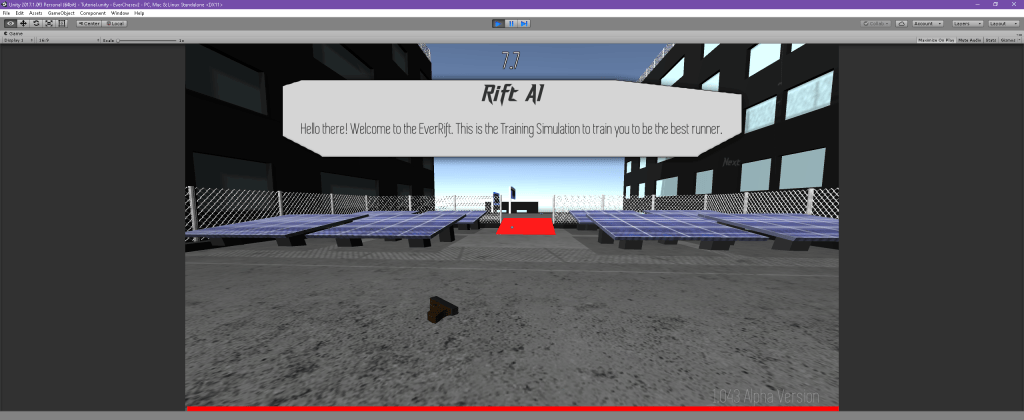
The text slowly writes onto the screen as you play, and can be skipped by pressing the enter key, instead of using the buttons on the screen. This helps for usability as you don’t need to pause the game, to be able to move the mouse to press a next button, it can be done from the keyboard during gameplay.
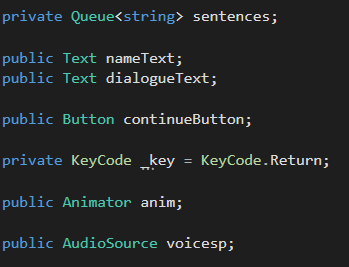
The queue variable was used to queue up the text per showing, allowing for multiple sentences to line up, ready to be shown on screen. The next two text variables are editable text boxes that can be changed inside of the game triggers, to change what the dialogue is saying and by who. The next is a button, which is no longer being used as of now. The keycode is how I mapped the enter key to be used rather than the button. The animator is so that the text can smoothly enter and leave the screen, and the audio source is to create a robot sounding voice as the text is on screen.
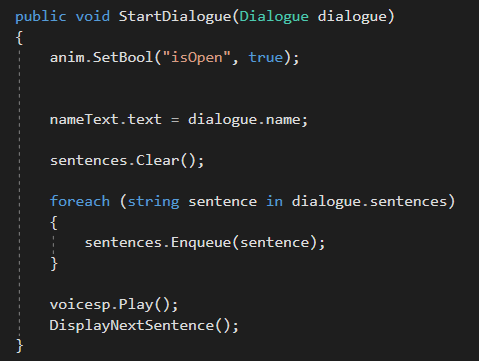
This function was called whenever the dialogue began, mapping the name of the person to the values, and clearing the queue now that a new dialogue has began. A loop is created, for every sentence that has been made in the dialogue, and then they are added to the queue. The voice line plays outside of the loop and the next function, named “DisplayNextSentence”, is called.
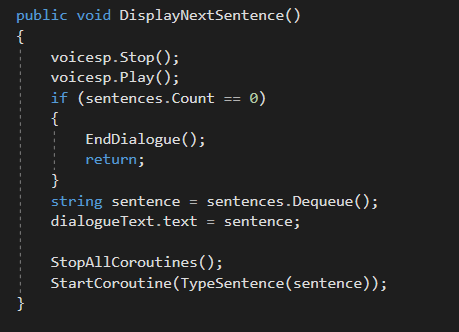
This function restarts the voice playing, and then checks if the queue of sentences is over. If it has finished, the conversation ends. If there is more conversation, then the current sentence being spoken is removed from the queue, and the typing animation co-routine is played.
As previously spoken about before, I created this system as a way to communicate certain goals and objectives to the player without actively interrupting or breaking immersion of the game. A small, stoppable text screen in certain areas is a fast and easy way to convey information to the character, as well as being easy for the player to skip if they do not wish to hear it.
The way that it has been created allows me to copy multiple of the same prefab for the voice line, adjust the collision zone and the text that is spoken, and it will be automatically queued, skipping the previously queued text and showing the newest interacted dialogue.
 EverChase Development Blog